RealDefense System Mechanic 11 Review
If your PC has started feeling sluggish after a few years of updates, background apps, and accumulated junk, you are not alone. RealDefense System Mechanic 11 is built to tackle that specific frustration: it scans your Windows system for the usual suspects—startup bloat, registry clutter, and performance drag—and offers fixes in a guided flow rather than a maze of manual tools. It is not a full antivirus replacement, and it is not a game-changer for a brand-new machine. It is a maintenance tool for the PC you already have, designed to keep it running closer to how it did when you first unboxed it.
If you are weighing whether to buy it, the RealDefense System Mechanic 11 package is the product to look at. It sits in the utility software space, aimed at users who want a single, organized interface for system health checks and cleanup.
Quick Answer
| Best for | Windows users who want a guided, all-in-one tool to clean up startup items, registry entries, and performance issues without digging into individual utilities. |
| Skip if | You prefer free, standalone open-source tools for specific tasks (like just cleaning startup or just optimizing the registry) or if you are running a non-Windows OS. |
| One line | A consolidated Windows maintenance suite that bundles cleaning, optimization, and security checks into one organized dashboard. |
Swipe sideways to compare →
What actually changes the buy is fit, what you should skip, and which tradeoffs show up after week one — not a longer spec sheet. If you already know the job, see current options while you read the criteria.
What the Official Page Actually Lists
The official product information for RealDefense System Mechanic 11 highlights a focus on system organization and clarity. The product themes emphasize a "quiet" and "sleep mode" approach to maintenance, suggesting the software is designed to run in the background or during idle times without constant user intervention.
Specific technical specifications, such as the exact number of included tools, supported Windows versions (typically Windows 10 and 11 for the current generation), and warranty details, should be verified on the current RealDefense product page, as these can change with updates. The core value proposition remains a unified interface for system health.
What reviewers say
Reviews from YouTube say this about the RealDefense System Mechanic 11.
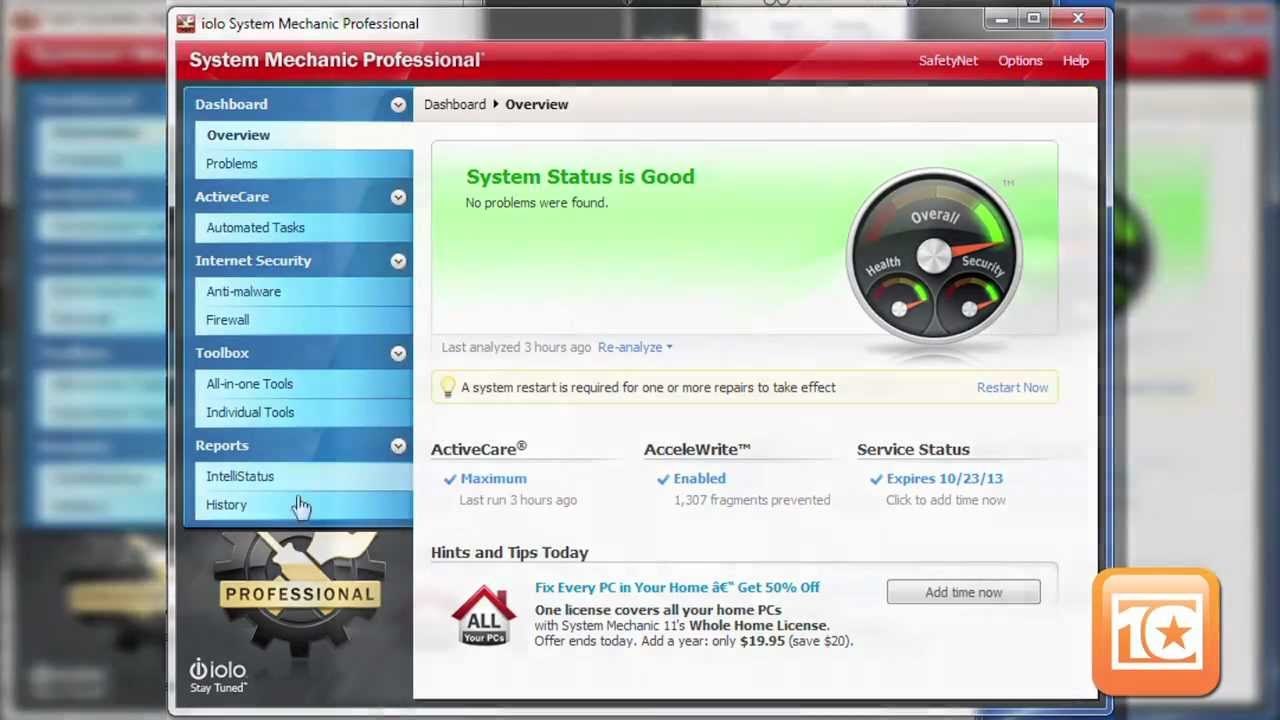
On YouTube, one reviewer noted, "And one of the best things about it is just that the fact that it's so organized and everything is clear." That sentiment aligns with the product’s design goal: reducing the cognitive load of system maintenance by grouping disparate tasks into a single, legible view. You can see current options.
Another YouTube video, titled "System Mechanic 11 5 Professional review," focuses on the professional tier of the software, indicating that the suite offers tiered features for different user needs. A third video, "System Mechanic REVIEW & DEMO," provides a visual walkthrough of the interface, which is helpful for users who want to see the "organized" layout before committing to a purchase. You can see current options.
Who it's for
This tool is best suited for users who feel overwhelmed by the number of small, separate utilities available for Windows maintenance. If you want to check your startup apps, clean temporary files, and monitor system health in one place, this is the job it does. It is also a good fit for less technical users who prefer a guided, step-by-step process over manual command-line or registry editing. You can see current options.
- Windows PC owners who notice gradual slowdowns and want a single solution.
- Users who value simplicity over granular control, preferring a dashboard that tells them what to fix.
- Home users and small offices looking for a standard, reputable maintenance suite. See options
Who should skip
If you are comfortable using free, specialized tools for each specific task—such as a dedicated startup manager, a free registry cleaner, and a separate disk cleaner—you may find the bundled approach redundant. This product is not designed for Linux or macOS users, nor is it a replacement for a dedicated antivirus or firewall. Confirm details on the current product page.
- Power users who prefer manual control over automated, guided fixes.
- Non-Windows users (Mac, Linux, Chromebook).
- Users who already have a comprehensive security suite that includes performance optimization features. See options
Mid-check
If the criteria above already match how you actually use the space, stop here and check current options before you keep reading comparison noise. Confirm details on the current product page.
How to choose in five minutes
- Check your Windows version: Ensure your PC is running a supported version of Windows (typically 10 or 11). See options
- Identify your pain point: Are you dealing with slow boot times, cluttered startup, or general sluggishness? If yes, this tool addresses those. See options
- Review the interface: Watch the demo videos linked in the sources below to see if the "organized" layout appeals to you. See options
- Compare with your current setup: If you are already using three or four different free tools, consider if consolidating them into one subscription or purchase is worth the convenience. See options
- Visit the store: If it looks like a fit, check the current pricing and any available bundles on the RealDefense System Mechanic 11 page.
FAQ
Is RealDefense System Mechanic 11 an antivirus? No. It is a system optimization and maintenance tool. It includes some security-related checks (like malware scanning in some tiers), but it is not a replacement for a dedicated antivirus product. You should still use a primary security suite.
Does it work on Mac or Linux? No. RealDefense System Mechanic 11 is designed for Windows operating systems.
What is the warranty or return policy? RealDefense typically offers a money-back guarantee on their software purchases, but the specific duration (often 30 days) and terms can vary by region and retailer. It is best to confirm the current return policy on the official RealDefense website before purchasing.
How does it differ from free tools? Free tools often handle one specific task (e.g., just startup or just disk cleanup). System Mechanic 11 bundles these tasks, along with registry cleaning and performance monitoring, into a single, guided interface. The trade-off is cost for convenience and integration. Check the official listing before you buy.
Bottom Line
RealDefense System Mechanic 11 is a solid choice for Windows users who want to simplify their system maintenance routine. It trades the granular control of individual utilities for a more organized, guided experience. If you find yourself juggling multiple small tools or feel unsure about what to fix on your PC, this suite offers a clear, centralized path to better performance. If you are a power user who prefers manual control, you may find it limiting. For the average user looking to keep their Windows PC running smoothly, it is a practical, well-regarded option.
Sources
- YouTube — https://www.youtube.com/watch?v=z_8LaktiD4c&t=170s
- YouTube — https://www.youtube.com/watch?v=ClDmvcdoY5I
- YouTube — https://www.youtube.com/watch?v=AGXPVULzUkU
Related Guides