AndaSeat Review — Worth It for Work-From-Home?
You’ve probably been sitting in the same chair for longer than you’d like to admit. Maybe it’s the flimsy office chair that creaks when you lean back, or the $150 “gaming” chair that looks aggressive but leaves your lower back aching by 3 p.m. The problem isn’t just comfort; it’s the confusion. You’re trying to buy a seat that handles eight hours of spreadsheets and then another two hours of intense gaming, but the marketing is split between “ergonomic” and “racing style,” leaving you unsure which one actually supports your spine. Check the official listing before you buy.
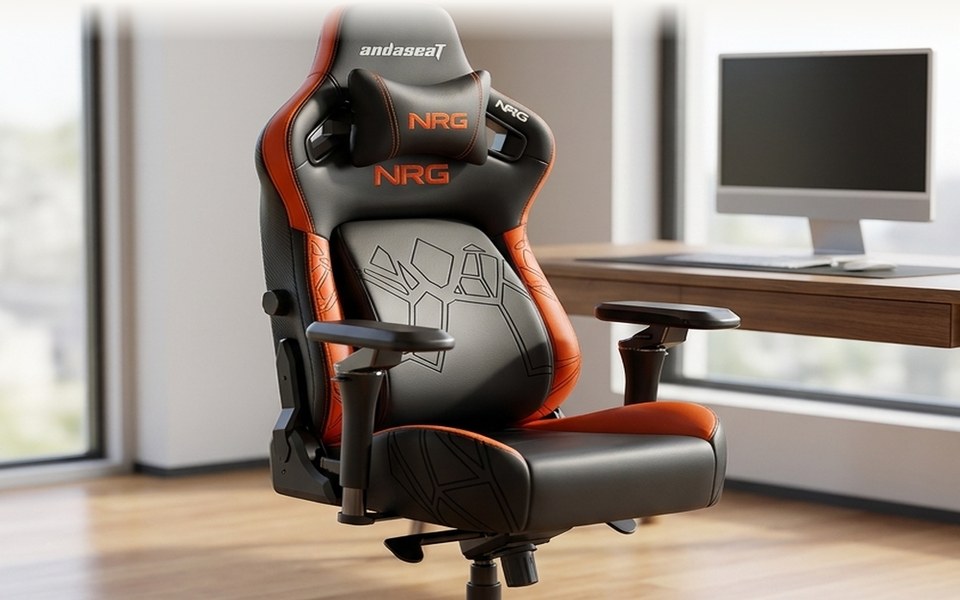
AndaSeat sits in the middle of that confusion. They build chairs that look like they belong in a high-end gaming setup but are engineered with the adjustability of a serious office chair. If you are tired of choosing between a chair that looks good and a chair that feels good, this guide breaks down which AndaSeat model actually fits your body and your budget.
Criteria: What actually changes the decision
When you are comparing chairs in this price range, the differences aren’t just in the fabric. They are in how the chair reacts to your body over a long period. Here is what to look for before you click "buy." Confirm details on the current product page.
| Factor | Why it matters for WFH/Gaming | What to look for in AndaSeat |
|---|---|---|
| Lumbar Support | Prevents slouching during long static periods. | Look for adjustable lumbar bars or dynamic tracking (like in the Phantom 4). |
| Seat Depth | Ensures your knees don’t press against the front edge. | Check the seat depth dimensions; the Kaiser 3 is often deeper for taller users. |
| Armrests | Supports typing and mouse use without shoulder strain. | 4D armrests (height, width, depth, pivot) are standard on higher tiers. |
| Material | Affects temperature and durability. | PU leather for style; Mesh (X-Air) for breathability. |
| Warranty | Protects against long-term wear. | AndaSeat offers a 5-year warranty on most models. |
Swipe sideways to compare →
Our shortlist
The Kaiser 3 Series: The Ergonomic Standard
If you are looking for the "safe" choice that has been proven over time, the Kaiser 3 is the one to beat. It has held the title of their four-year best seller for a reason: it nails the balance between a solid build and a price that doesn’t require a second mortgage. This chair is designed with a focus on ergonomic lumbar support, meaning the backrest isn’t just a flat slab; it’s contoured to align with your spine. For the remote worker who spends eight hours at a desk, the Kaiser 3 provides the stability needed to maintain posture without feeling like you’re strapped into a medical device. You can see current options.
The aesthetic is key here. Unlike the aggressive, bucket-seat look of older gaming chairs, the Kaiser 3 has a cleaner, more office-appropriate profile. It’s the kind of chair you can have in a home office that doesn’t scream "gamer" if you have a video call. If you are on the larger side, the Kaiser 3 XL is specifically engineered for big and tall users, offering a wider seat and higher weight capacity. It’s a straightforward, no-nonsense option that prioritizes long-term comfort over flashy features. Check the current pricing on the Kaiser 3 to see if it fits your budget.
The Phantom 4 Series: Made to Move
The Phantom 4 is where AndaSeat gets interesting. Starting at around $289, this series introduces "dynamic auto-tracking lumbar support." In plain English, the lumbar support moves with you. When you lean back, the support shifts; when you lean forward, it adjusts. This is a significant upgrade for people who don’t sit perfectly still. If your work involves leaning into the screen or you play games that require you to shift your weight constantly, the Phantom 4 is a better fit than a static chair.
This model is also more affordable than the top-tier Kaiser models, making it a strong entry point for those who want premium features without the premium price tag. The design is sleek, and the dynamic support solves the common complaint that "the lumbar pad is in the wrong place for me." If you find that static lumbar bars always feel a bit off, the Phantom 4’s auto-tracking system is worth a look. It’s a modern take on the ergonomic chair that feels more responsive to how you actually move.
The X-Air Series: The Breathable Option
Not everyone wants a padded, leather-wrapped chair. If you run hot or live in a warm climate, the X-Air Series is the mesh alternative. It is IGR certified and has won TITAN Innovation Awards for its design. The mesh back allows for airflow, which can make a huge difference during long sessions where a solid backrest might feel stifling. You can see current options.
The X-Air is a bit different from the traditional "gaming" look; it’s more of a high-performance ergonomic mesh chair. It’s ideal for those who prioritize temperature regulation over the plush feel of PU leather. If you’ve tried other mesh chairs and found them too rigid or uncomfortable, the X-Air is a step up in terms of support and build quality. See the X-Air lineup if breathability is your top priority.
Alternatives and Watch-Outs
The Novis Series serves as a more budget-friendly entry point within the AndaSeat lineup. While it lacks the advanced adjustability of the Kaiser or Phantom lines, it offers a significant step up from a cheap office chair, making it a solid starting point if you’re on a tighter budget.
At the other end of the spectrum, the Xtreme Series represents the top-tier, high-end option. It is designed for those who want the absolute best build quality and materials. Because it is a significant investment, it is best suited for users who plan to keep the chair for many years and value premium materials over entry-level pricing. Check the official listing before you buy.
If you are considering the used market, be aware that while a used Aeron is a great chair, it may not have the specific gaming-style adjustability or the aesthetic you’re looking for. AndaSeat’s new chairs come with a 5-year warranty, which used chairs typically do not.
Mid-check
If you are still torn between the Kaiser 3 and the Phantom 4, ask yourself this: Do you sit mostly still, or do you move a lot? If you are a static worker who needs a solid, stable seat, the Kaiser 3 is the safer bet. If you lean, shift, and move throughout the day, the Phantom 4’s dynamic support will likely feel more natural. Both come with the 5-year warranty, so you have protection either way. Compare the current models side-by-side to see the specific feature differences.
How to choose in 5 minutes
- Check your height and weight: If you are over 6'0" or over 250 lbs, look at the Kaiser 3 XL or the Xtreme Series. If you are average size, the standard Kaiser 3 or Phantom 4 will fit. See options
- Determine your climate: If you run hot, choose the X-Air Series mesh. If you prefer a padded feel, go with the Kaiser or Phantom. See options
- Assess your movement: Static sitter? Kaiser 3. Active mover? Phantom 4.
- Set your budget: Under $400? Phantom 4 or Novis. Over $500? Kaiser 3 or X-Air.
- Verify the warranty: All major models come with a 5-year warranty, but confirm the current terms on the product page before purchasing. See options
FAQ
Is AndaSeat good for work-from-home?
Yes, particularly the Kaiser 3 and X-Air series. These models are designed with ergonomic lumbar support and adjustability that suits long desk sessions. The Kaiser 3 is often cited as a top choice for WFH because it balances style and comfort without the overly aggressive gaming aesthetic. You can see current options.
What is the difference between a gaming chair and an office chair?
Traditionally, gaming chairs focused on style and aggressive design, while office chairs focused on strict ergonomics. AndaSeat bridges this gap by offering chairs that have the adjustability of an office chair (lumbar support, armrests, recline) with the style of a gaming chair. The Phantom 4 is a good example of this hybrid approach, offering dynamic lumbar support that is more advanced than many standard office chairs.
How long does the AndaSeat warranty last?
AndaSeat offers a 5-year warranty on most of its chairs. This is a significant advantage over many competitors that only offer 1-2 years. It covers defects in materials and workmanship, giving you peace of mind for long-term use.
Do AndaSeat chairs fit big and tall users?
Yes. The Kaiser 3 XL is specifically designed for big and tall users, offering a wider seat and higher weight capacity. The Xtreme Series also offers robust build quality for larger users. Always check the specific dimensions and weight limits on the product page to ensure a proper fit. Check the official listing before you buy.
Is the Phantom 4 worth it over the Kaiser 3?
The Phantom 4 is worth it if you value dynamic lumbar support and a lower price point. The Kaiser 3 is worth it if you prefer a more traditional, stable build and have been a fan of the classic AndaSeat design. Both are excellent, but the Phantom 4 offers a more modern, responsive feel.
Bottom line
AndaSeat is a strong choice for anyone who is tired of choosing between a chair that looks good and a chair that feels good. The Kaiser 3 remains the gold standard for those who want a proven, ergonomic workhorse, while the Phantom 4 offers a more dynamic experience for active sitters. With a 5-year warranty backing the lineup, you can buy with confidence knowing the chair is built to last. See current options
Related guides
AndaSeat for work + play setups
- Hybrid gaming/work aesthetic options
- Clear model lineup
- Better than mystery marketplace chairs
Who should skip
- · You want pure mesh corporate look only
- · Your room can't fit a larger chair