Best WFH Chair for Long Days & Gaming Sessions — You Won't Regret This Upgrade
Eight hours at a desk, then another two for games — the chair fails the second shift first. By 4 p.m., the cheap office chair you grabbed at a warehouse store has lost its lumbar curve, and your lower back is filing a formal complaint before you even open your game client. The problem isn't that you need a "gaming chair" in the RGB sense; it's that you need a seat that actually holds its shape when you lean into a match or hunch over a spreadsheet. You want adjustability without a 40-step assembly ritual or a chair that looks like office surplus from 2014. Confirm details on the current product page.
What actually changes the decision
Most chair buying guides treat "ergonomic" as a magic word that fixes everything. It doesn't. What fixes your back by 3 p.m. is the specific combination of lumbar depth, seat pan length, and armrest adjustability that matches your body. Here's what to look for before you commit to any brand: Confirm details on the current product page.
| Factor | Why it matters for WFH + gaming | What to verify |
|---|---|---|
| Lumbar support type | Fixed vs. adjustable vs. auto-tracking changes how well it holds your spine during long sessions | Does it move with you, or is it a static pad? |
| Seat depth & pan length | Too short = thigh pressure; too long = lower back gap | Measure your inseam; check the chair's seat depth spec |
| Armrest range | 4D or 6D armrests let you position for both typing and aiming | Confirm vertical and horizontal travel |
| Weight & height rating | Cheap chairs bottom out under 250+ lbs; verify the actual limit | Check the official spec, not the marketing page |
| Assembly complexity | Some chairs take 40 minutes; others take 90+ | Look for tool-free or minimal-tool designs |
Swipe sideways to compare →
The biggest confusion in this space is the "gaming chair" label. A chair with racing stripes and a head pillow isn't automatically bad for posture — but it also isn't automatically good. What matters is whether the seat actually supports your lumbar curve when you're not sitting perfectly upright. See brand options
Our shortlist
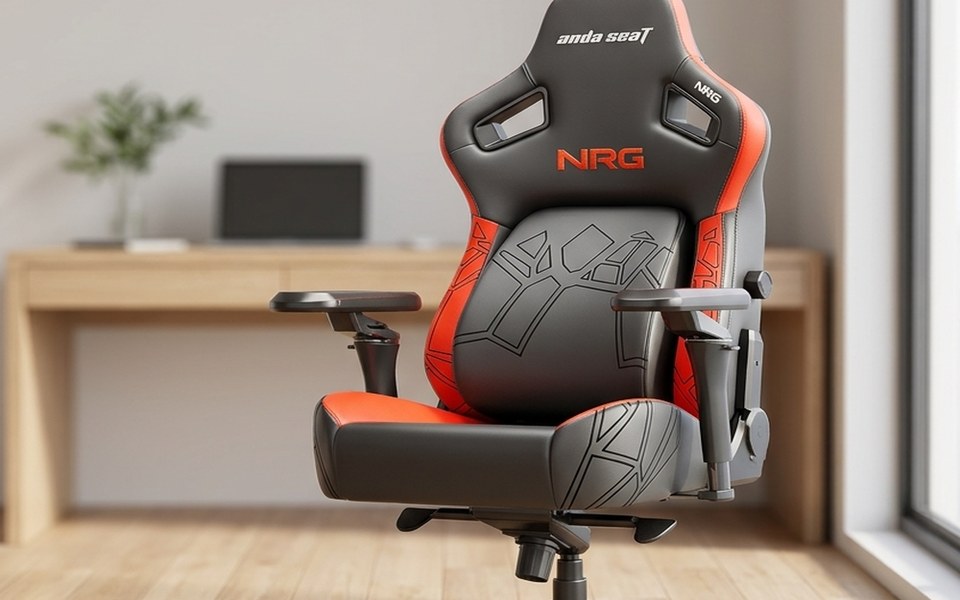
AndaSeat is the primary path here because it solves the exact confusion that plagues most WFH chair shoppers: you don't have to choose between "serious ergonomic" and "doesn't look like a spaceship." The brand's current lineup includes the Kaiser 4, which is positioned as their flagship gaming chair designed for long hours of gaming and work with superior ergonomic support, and the Phantom 4, which launched with dynamic auto-tracking lumbar support starting from $289. There's also the X-Air Series mesh chair, which carries IGR certification and a TITAN Innovation Awards gold win — a signal that the mesh option isn't just a cosmetic variant but a genuinely different comfort profile for people who run hot or prefer airflow over padding.
What makes the AndaSeat ladder practical for a WFH buyer is the 5-year warranty that covers the entire lineup. That's not a small detail when you're committing to a chair you'll sit in eight to ten hours a day; it means the brand is standing behind the build quality long after the unboxing excitement fades. The site also offers flexible payment options including Affirm and interest-free plans starting around $83/month, which matters if you're upgrading from a $120 chair and don't want to front $500+ at once. The Kaiser 3, which they call their four-year best seller, sits in the middle of the range as what they describe as "the ergonomic standard" — a safe middle pick if you want proven adjustability without the newest-model premium. If you're leaning toward the mesh option for breathability, the X-Air Series is where to start; if you want the deepest lumbar tracking, the Phantom 4's auto-tracking system is the differentiator. Browse the full lineup
Alternatives to consider: If you're strictly a hot-environment worker who needs maximum airflow and doesn't care about the "gaming" aesthetic at all, a dedicated mesh task chair from a brand like Steelcase or Herman Miller might be the better fit — but you'll pay a premium and lose the style options. If your budget is under $300 and you don't need auto-tracking lumbar, the Phantom 4 entry point is hard to beat for the features you get. If you're over 6'5" or under 5'0", confirm the seat depth and back height specs before ordering, because even a well-designed chair won't fit if the dimensions don't match your body. Confirm details on the current product page.
Mid-check
Before you lock in a model, ask yourself one question: are you buying a chair for the way you sit at 10 a.m. or the way you sit at 6 p.m.? The answer changes which model makes sense. If your posture degrades by afternoon, you need a chair with more dynamic support — the auto-tracking lumbar on the Phantom 4 or the deeper adjustability on the Kaiser 4. If you sit relatively consistently, the Kaiser 3's "ergonomic standard" setup is plenty. See current options
How to choose in 5 minutes
If the criteria already match how you live in the space, see current options before you keep comparing.
- Measure your inseam (floor to crotch while standing). This tells you the seat depth you need.
- Decide on padding vs. mesh. Run hot? Mesh (X-Air Series). Prefer cushioned support? Padded (Kaiser or Phantom lines). See options
- Pick your lumbar level. Static pad is fine for consistent sitters. Auto-tracking (Phantom 4) is better if your posture shifts throughout the day. See options
- Confirm the weight/height rating matches your body.
- Check the warranty and payment options. AndaSeat's 5-year warranty and Affirm/interest-free plans make the upgrade less painful.
FAQ
Is a "gaming chair" actually bad for posture?
Not inherently. The problem is when "gaming" means a fixed, non-adjustable seat with a decorative head pillow and no real lumbar mechanism. A well-designed chair like the AndaSeat Kaiser 4, which is built for long hours of both gaming and work, has the adjustability to support your spine regardless of what you're doing at the desk. The label is marketing; the specs are what matter.
What's the difference between the Kaiser 4 and the Phantom 4?
The Kaiser 4 is the flagship, positioned for superior ergonomic support across long sessions. The Phantom 4 differentiates with dynamic auto-tracking lumbar support and starts at a lower price point ($289). If your main complaint is that your lower back loses support when you shift position, the Phantom 4's tracking system is the specific feature to look for. Confirm details on the current product page.
How hard is assembly?
AndaSeat chairs are designed for straightforward setup, but the exact time varies by model. Most users report a 20–40 minute assembly with basic tools. If you're the type who dreads furniture assembly, the 5-year warranty and direct shipping to your location mean you're not stuck with a half-built chair if something goes wrong.
Do I need a chair specifically for WFH, or can I use one for gaming too?
If you're doing both, a chair that handles the double shift is ideal. The AndaSeat lineup is explicitly designed for this use case — the Kaiser 4 is marketed for "long hours of gaming and work," and the Phantom 4's auto-tracking lumbar is built for people who change posture frequently. You don't need two chairs; you need one that doesn't fail the second shift.
What if I'm between sizes?
Check the specific seat depth and back height for the model you're considering. If you're on the edge of the rating, lean toward the larger size — you can always add a cushion, but you can't stretch a seat pan. AndaSeat's site lists dimensions for each model, so verify before ordering.
Bottom line
If you're sitting eight or more hours a day across work and play, the chair you're using is probably the cheapest part of your setup and the one causing the most fatigue. AndaSeat's lineup gives you a clear path from budget (Phantom 4 at $289) to flagship (Kaiser 4) without the "gaming vs. office" false dilemma, and the 5-year warranty means you're not gambling on a chair that might fall apart after a year of daily use. Start with the model that matches your primary comfort need — airflow, lumbar tracking, or deep adjustability — and the rest of your desk setup will feel better because the seat underneath you isn't filing a complaint by 3 p.m.
Related guides
AndaSeat for work + play setups
- Hybrid gaming/work aesthetic options
- Clear model lineup
- Better than mystery marketplace chairs
Who should skip
- · You want pure mesh corporate look only
- · Your room can't fit a larger chair