Rexing M3 3 Review: 3-Channel 1080p Mirror Dash Cam with GPS
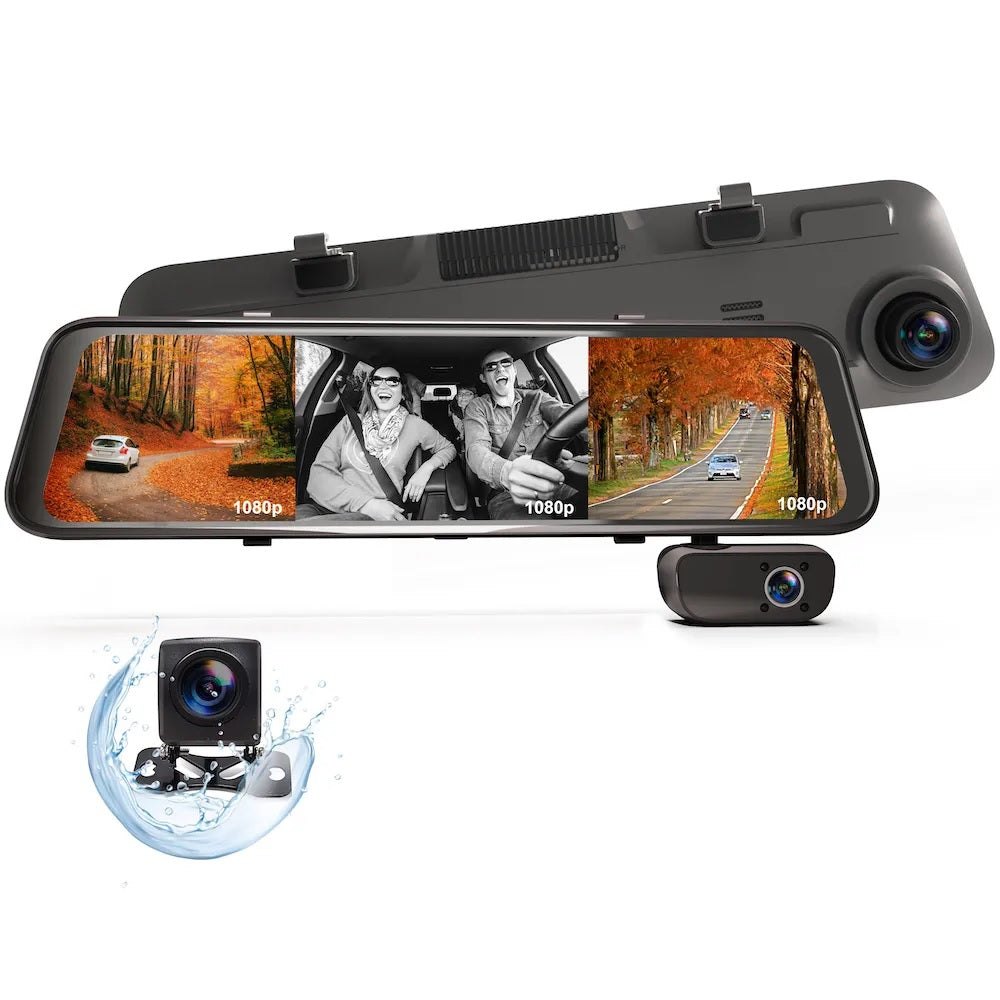
You do not need a mirror that only reflects your own tired face at 2 a.m. The Rexing M3 3 replaces that glass with a 1080p display that shows you the road ahead, the cabin, and the rear in real time. It is a three-channel system: front, cabin, and rear, all recording at 1080p, with GPS logging built in. If you drive a vehicle where blind spots matter—SUV, van, or a car with heavy cargo—the M3 3 turns your rearview mirror into a surveillance node that also happens to let you see traffic behind you. The mirror form factor keeps the dashboard clean; no extra boxes hanging off the windshield.
If you want a single unit that covers front, inside, and back without running three separate cameras, see current options for the Rexing M3 3 before you commit.
What the official page actually lists
The Rexing product page for the Rexing M3 3 describes it as a 3-channel mirrored dash cam: 1080p front, 1080p cabin, 1080p rear, with GPS. Key facts from the official listing:
| Spec | Detail |
|---|---|
| Channels | 3 (front, cabin, rear) |
| Resolution | 1080p on all three channels |
| Form factor | Mirror-style (replaces rearview mirror) |
| GPS | Built-in GPS logger |
| Parking mode | Supported (requires active fuse or cigarette-plug power when engine is off) |
| Firmware | Rexing states they are "constantly improving our products through firmware updates" |
| Support | 18-month support backed by Rexing's online support team |
| Storage | Compatible with Rexing 256GB microSDXC UHS-I cards (sold separately) |
Swipe sideways to compare →
A customer note on the official page warns that parking mode can drain the battery if the unit is not powered through an active fuse or a cigarette plug that stays charged while the car is off. Verify current firmware version and parking-mode power requirements on the Rexing M3 3 product page before installing.
What reviewers say
Reviews from YouTube say this about the Rexing M3 3.
A YouTube reviewer of the M3 mirror dash cam calls out a standout feature, saying: "And this brings me to what I think is the best feature on the Rexin M3 mirror dash cam." That kind of single-feature highlight is exactly what you want from a mirror cam—the GPS logging or the multi-angle live view doing the heavy lifting so you are not juggling three separate screens. Confirm details on the current product page.
A second YouTube review, titled "REXING M3 1080P Car Dashcam REVIEW," covers the 1080p recording quality across the channels. For a driver who wants clear, timestamped footage of the front road and the back of a long vehicle without stepping up to 4K, 1080p on all three channels is the practical sweet spot.
A third YouTube review, "Is the REXING M3 Dash Cam Worth It? Jeep Wrangler Review!," tests the unit in a specific vehicle context. If you drive a Wrangler, an SUV, or any car with a high roofline and wide A-pillars, that kind of vehicle-specific fit check tells you whether the mirror housing clears your windshield and whether the rear camera angle works with your rear window shape.
Who it's for
The Rexing M3 3 is aimed at drivers who need coverage on three sides of the vehicle and want it in one mirror-sized package.
- Fleet and ride-share drivers who need cabin footage for passenger safety and rear footage for cargo or hitch visibility.
- SUV, van, and truck owners with large blind spots who want a live rear view without a separate backup camera system.
- Drivers who value GPS-stamped footage for insurance claims, where each clip carries location and speed data.
- Anyone who wants a clean dashboard and prefers the mirror form factor over a cluster of separate cameras and cables. See options
If you fall into one of those categories, the Rexing M3 3 is the unit to shortlist.
Who should skip
Not every driver needs three channels. The M3 3 is overkill if your needs are simpler. Check the official listing before you buy.
- Drivers who only want front recording. If you just need a single 1080p front cam for basic insurance coverage, a single-lens unit is cheaper and simpler to install.
- 4K front-recording enthusiasts. The M3 3 tops out at 1080p on all channels. If you want 4K front footage for long-range license-plate readability, look at a dedicated 4K front cam instead.
- Drivers with a tight budget for a basic cam. The three-channel mirror package costs more than a single-lens dash cam. If your only goal is "something on the windshield that records the road," the M3 3 is more system than you need.
- Vehicles with non-standard rearview mirror mounting. If your car uses a unique mirror bracket or has a factory head-up display in the mirror housing, verify fitment before ordering. See options
For a simpler setup, you can compare single-channel options in our dash cam buying guide before deciding. You can see current options.
Mid-check
If the criteria above already match how you actually use the space, stop here and check current options before you keep reading comparison noise. Confirm details on the current product page.
How to choose in five minutes
- Count your channels. Do you need front only, front + rear, or front + cabin + rear? The M3 3 is the three-channel option. If you only need two, a dual-channel unit saves money. See options
- Check your power situation. Parking mode on the M3 3 needs an active fuse or a cigarette-plug that stays charged while the engine is off. If your car has a fused power outlet that dies when you turn off the key, you will want a hardwire kit. Rexing sells a Smart Hardwire Kit with 360° motion detection that pairs with this system.
- Pick your storage. The M3 3 works with Rexing 256GB microSDXC UHS-I cards. For continuous 3-channel recording, 256GB gives you several days of loop footage before overwriting. Verify current card compatibility on the product page.
- Confirm GPS is in your use case. If you do not need GPS-stamped footage, you are paying for a feature you will not use. If you do need it for insurance or fleet tracking, the built-in GPS logger on the M3 3 saves you a separate GPS unit. See options
- Read the firmware note. Rexing states they push firmware updates regularly. Check the official product page for the latest firmware version and any known parking-mode power notes before you buy.
If you want a broader comparison of mirror-style vs. traditional dash cams, our mirror dash cam guide walks through the tradeoffs. Confirm details on the current product page.
FAQ
Does the Rexing M3 3 record in 4K? No. All three channels—front, cabin, and rear—record at 1080p. If 4K front recording is a hard requirement, the M3 3 is not the right unit.
Does the M3 3 have a built-in GPS logger? Yes. GPS is included on the M3 3, so each video clip is stamped with location and speed data. This is useful for insurance claims and fleet tracking. Check the official listing before you buy.
Can I use the M3 3 parking mode without a hardwire kit? The official product page notes that parking mode requires the unit to be powered through an active fuse or a cigarette plug that stays charged while the car is off. If your vehicle's 12V outlet shuts off with the ignition, you will need a hardwire kit to keep parking mode running without draining the battery. Confirm details on the current product page.
What storage card does the M3 3 use? The M3 3 is compatible with Rexing 256GB microSDXC UHS-I cards, which are designed for continuous recording and 4K/full-HD video capture. Verify current card recommendations on the product page.
How long is Rexing's support window? Rexing states that their products come with 18-month support backed by their online support team. Confirm current support terms on the Rexing USA site before purchase.
Will the M3 3 fit my vehicle's rearview mirror? The M3 3 is a mirror-form-factor unit that replaces your existing rearview mirror. Fitment depends on your vehicle's mirror bracket and windshield shape. If you drive a Jeep Wrangler or a similar vehicle with a high roofline, a vehicle-specific review (like the Jeep Wrangler review on YouTube) can show you the mounting in context. Check the official listing before you buy.
If the FAQ answered your main objections and you want current models or trial terms, see brand options.
Bottom line
The Rexing M3 3 is a three-channel, 1080p, mirror-style dash cam with built-in GPS. It is the right pick if you need front, cabin, and rear coverage in one clean package and you want GPS-stamped footage for insurance or fleet use. It is not the right pick if you need 4K front recording or if you only want a simple single-lens front cam.
The parking-mode power requirement is the one thing to sort out before you install: if your car's 12V outlet dies with the ignition, budget for a hardwire kit. Beyond that, the M3 3 does what it says on the box—three 1080p channels, GPS, mirror form factor, 18-month support. Check the official listing before you buy.
If you are ready to move forward, see current options for the Rexing M3 3 and check the product page for the latest firmware and parking-mode notes before you order.
Sources
- YouTube — "And this brings me to what I think is the best feature on the Rexin M3 mirror dash cam" — https://www.youtube.com/watch?v=5TAoZ4_rk1I&t=816s
- YouTube — "REXING M3 1080P Car Dashcam REVIEW" — https://www.youtube.com/watch?v=sgEt1Ur32iY
- YouTube — "Is the REXING M3 Dash Cam Worth It? Jeep Wrangler Review!" — https://www.youtube.com/watch?v=K4Qyt2nfVEI
- Official product page — https://rexing.com/products/rexing-m3-3-channel-1080p-front-1080p-cabin-1080p-rear-mirrored-dash-cam-w-gps