Malwarebytes Personal Data Remover Review: What It Does, What It Costs, and Who It’s For
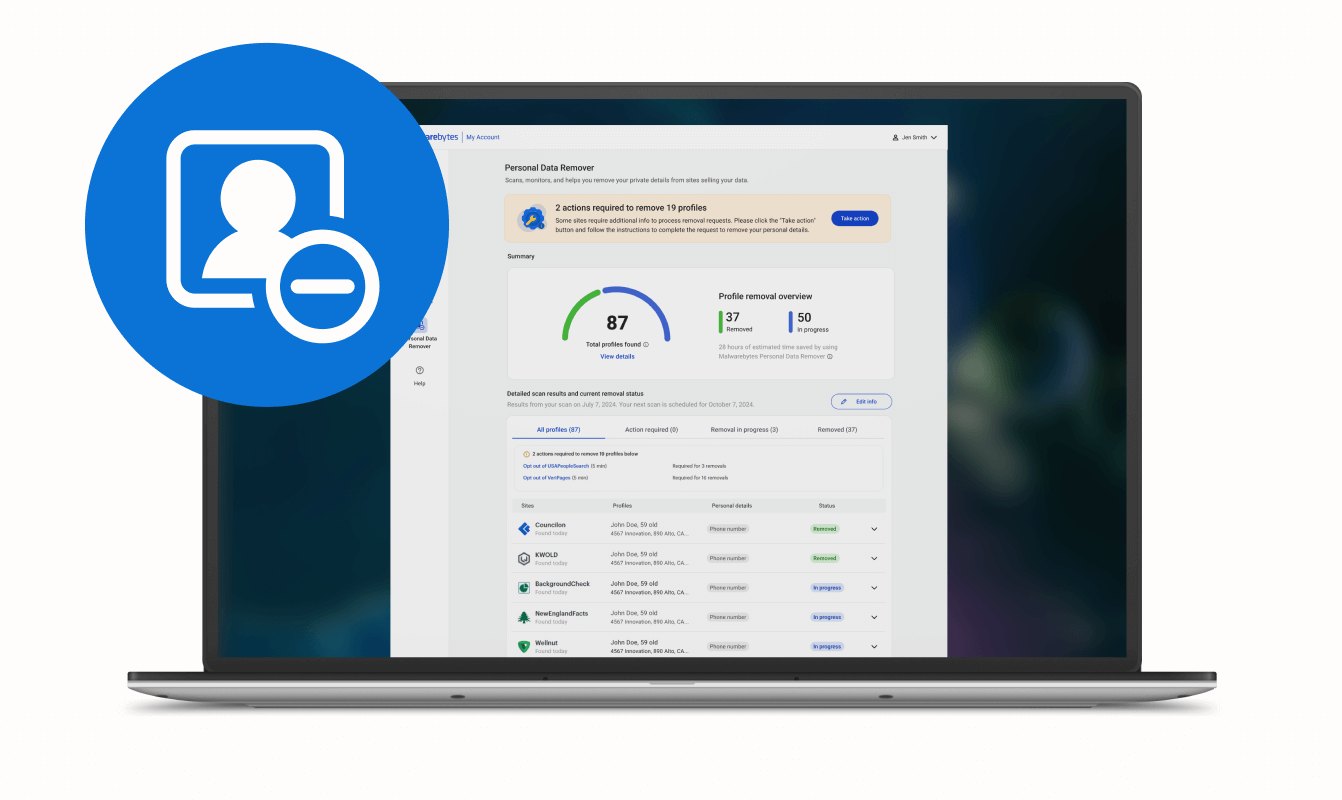
If your name, email, or phone number is showing up in data broker databases you never signed up for, the Malwarebytes Personal Data Remover is built for exactly that job. It’s not an antivirus scan and not a password manager; it’s a privacy service that digs through 100+ data broker sites, finds your personal information, and handles the removal requests for you. The official page positions it as a monthly subscription that includes deep scans, automatic and guided removals, and ongoing monitoring with progress reports. For people who are tired of manually filing opt-out forms one broker at a time, this is the product to look at before you decide.
You can see current options for the Malwarebytes Personal Data Remover to check the latest monthly pricing and plan details before committing.
Quick Answer
| Best for | People who want a managed service to find and remove their personal data from 100+ data brokers without doing the paperwork themselves |
| Skip if | You only need basic antivirus protection, or you prefer to handle data broker opt-outs manually for free |
| One line | A monthly subscription that scans, removes, and monitors your personal data across major data broker databases |
Swipe sideways to compare →
What actually changes the buy is fit, what you should skip, and which tradeoffs show up after week one — not a longer spec sheet. If you already know the job, see current options while you read the criteria.
What the Official Page Actually Lists
The Malwarebytes Personal Data Remover page provides the following structured details:
| Detail | What the official page says |
|---|---|
| Core function | Deep scans across 100+ data brokers’ databases |
| Removal method | Automatic and guided removals |
| Ongoing features | Continued monitoring, progress reports, and confirmations |
| Time savings claim | Subscribers save up to 318 hours of work per year |
| Broker frequency | Average users appear 2–3 times per year on the same sites |
| Pricing model | Monthly subscription (not a one-time purchase) |
| Money-back guarantee | Not included in the 60-day money-back guarantee due to monthly pricing |
| Bundle option | Can be added to the Malwarebytes Ultimate Ongoing plan for device security, VPN, and Identity Theft Protection |
Swipe sideways to compare →
If you need to verify the exact current monthly rate or any changes to the broker list, confirm those details on the brand page before subscribing. The 60-day return window mentioned elsewhere on the Malwarebytes site does not apply to this specific monthly product, which is a detail worth noting before you check the current pricing and plan options.
What Reviewers Say
Reviews from YouTube and SmartCustomer say this about the Malwarebytes Personal Data Remover and the broader Malwarebytes ecosystem.
YouTube — A 2026 review video asks directly, “Should you get it in 2026?” and frames the product as a legitimate consideration for consumers worried about data exposure. The fact that dedicated review content is being produced specifically around this SKU in 2026 signals that the product has enough market presence and consumer interest to warrant independent evaluation. Watch the 2026 review. Check the official listing before you buy.
YouTube — In another video, the narrator notes that “Malwarebytes earned nearly perfect results in the latest evaluation” from AV-Test. While that specific quote references Malwarebytes’ broader security reputation rather than the Personal Data Remover alone, it speaks to the brand’s credibility in the privacy and security space, which matters when you’re handing a service the task of navigating broker databases on your behalf. See the AV-Test discussion.
SmartCustomer — A reviewer describes Malwarebytes as software that “fills the gaps in AV software that malware is made to exploit” and reports “a lot of success using MalwareBytes in combination with Windows Defender.” This is a brand-level comment rather than a review of the Personal Data Remover specifically, but it reinforces that the maker behind this product is trusted by users who pair it with other security tools. Read the SmartCustomer review.
Who It’s For
If you’ve ever Googled your own name and found your email, address, or phone number listed on a site you never visited, the Malwarebytes Personal Data Remover is designed for that exact frustration. It’s a product for people who want the data broker cleanup handled for them rather than spending weekends filling out opt-out forms.
- Privacy-conscious professionals whose personal data is at higher risk of being targeted due to their industry or public profile
- Anyone who has experienced a data breach and wants to proactively scrub their info from brokers who may have picked it up
- People who value time savings — the official page claims subscribers save up to 318 hours per year, which makes sense if you factor in the manual research, form-filling, and follow-up that broker opt-outs typically require
- Malwarebytes subscribers who already use other parts of the ecosystem and want to add data removal to their existing protection stack
- Families who want a single subscription to cover data broker removal without managing multiple services
If you’re leaning toward this, you can compare the Personal Data Remover with the Ultimate Ongoing bundle to see whether adding device security and VPN makes sense for your setup.
Who Should Skip
The Personal Data Remover is a monthly subscription, not a one-time tool, and that recurring cost is the main reason some people should pass. It also doesn’t replace the other layers of digital security you should already have in place. Check the official listing before you buy.
- People who only need antivirus or anti-malware protection — this product doesn’t scan your device for threats; for that, look at Malwarebytes’ other security products or a dedicated antivirus. You can explore Malwarebytes’ full product lineup to find the right fit if your main concern is device security rather than data broker removal.
- Budget-conscious users who are comfortable doing manual opt-outs — data broker removal is possible for free if you’re willing to research each broker and file requests yourself; this product automates that process for a monthly fee
- People who don’t mind occasional data broker listings — if your info appearing on a few broker sites doesn’t bother you and you’re not in a high-risk profession, the subscription may not justify the cost
- Anyone expecting a one-time purchase — the monthly pricing model means ongoing commitment; if you want a single scan-and-remove action, this isn’t structured that way
- Users who need a 60-day money-back guarantee — the official page explicitly states that Personal Data Remover is not covered by the 60-day money-back window because of its monthly pricing structure
If you’re unsure whether the monthly cost is worth it for your situation, read through the current plan details and pricing before signing up.
Mid-check
If the criteria above already match how you actually use the space, stop here and check current options before you keep reading comparison noise. Confirm details on the current product page.
How to Choose in Five Minutes
Here’s a practical way to decide whether the Malwarebytes Personal Data Remover fits your needs:
- Do a quick self-audit. Search your name, email, and phone number on a few major data broker sites. If you find your info listed in multiple places, the manual cleanup effort is real and the time savings claim starts to make sense. See options
- Check the monthly cost. The official page lists monthly pricing but doesn’t always display the exact dollar figure in the main description. Verify the current rate on the product page before you commit. See options
- Decide if you want the bundle. If you also want device security, a VPN, and Identity Theft Protection, the Malwarebytes Ultimate Ongoing plan bundles the Personal Data Remover with those features. If you only want data broker removal, the standalone monthly option is the right path.
- Factor in the no-guarantee detail. Since this product sits outside the 60-day money-back window, make sure you’re comfortable with the monthly commitment before subscribing. See options
- Set a review checkpoint. After the first month or two, check the progress reports and confirmations the service provides. If your data is coming off broker sites and the monitoring is catching re-listings, the subscription is doing its job. See options
You can see the current options and pricing for the Personal Data Remover to complete step two before making your call.
FAQ
Is the Malwarebytes Personal Data Remover the same as Malwarebytes antivirus? No. The Personal Data Remover is a privacy service focused on finding and removing your personal information from data broker databases. It doesn’t scan your computer for malware. If you need both, the Malwarebytes Ultimate Ongoing plan bundles data removal with device security, VPN, and Identity Theft Protection.
How many data brokers does it scan? The official page states that the service performs deep scans across 100+ data brokers’ databases. The exact list of brokers can shift over time, so verify the current broker coverage on the product page if you need specifics. Confirm details on the current product page.
Is there a money-back guarantee? No. The official page explicitly notes that because Personal Data Remover uses monthly pricing, it is not included in the 60-day money-back guarantee that applies to other Malwarebytes products.
Can I cancel after the first month? The product is structured as a monthly subscription, which typically means you can cancel at the end of any billing cycle. Confirm the current cancellation terms on the brand page before subscribing, as subscription policies can change. Check the official listing before you buy.
Does it work on mobile devices? The Personal Data Remover is a web-based privacy service that handles data broker removal; it doesn’t require a device-specific app in the way an antivirus does. For mobile security, you’d look at Malwarebytes’ other product offerings. You can browse the full Malwarebytes product range to see what’s available for different platforms.
Is it worth it if I’m not in a high-risk profession? If your personal data is already appearing on broker sites and you’d rather not handle the opt-out process manually, the time savings alone may justify the cost. If your info isn’t showing up anywhere and you’re comfortable with the status quo, the subscription may not be necessary right now. Confirm details on the current product page.
Bottom Line
The Malwarebytes Personal Data Remover does one specific job: it finds your personal information on 100+ data broker sites and handles the removal for you, with ongoing monitoring to catch re-listings. If that’s a problem you want solved without spending hours on manual opt-outs, it’s a straightforward product that does what it says. The monthly pricing and the lack of a 60-day money-back guarantee are the two things to weigh carefully before you subscribe. If you’re already in the Malwarebytes ecosystem or want a bundled privacy and security setup, the Ultimate Ongoing plan is worth a look. Otherwise, the standalone Personal Data Remover is the product to evaluate on its own merits.
See current options for the Malwarebytes Personal Data Remover
If you’re still deciding, our guide to data broker removal options walks through the manual and automated approaches side by side, and our guide to choosing privacy software covers how to match a privacy tool to your actual risk profile.
Sources
- YouTube — Malwarebytes review | Should you get it in 2026? — https://www.youtube.com/watch?v=9i66wGLJjL8
- YouTube — AV-Test evaluation discussion — https://www.youtube.com/watch?v=99rWdUpV97Q&t=45s
- SmartCustomer — Malwarebytes brand review — https://www.smartcustomer.com/reviews/malwarebytes.com#8
Related