TP-Link USA Tapo S500D Review: Smart Dimmer Switch for 2.4GHz Wi-Fi Homes
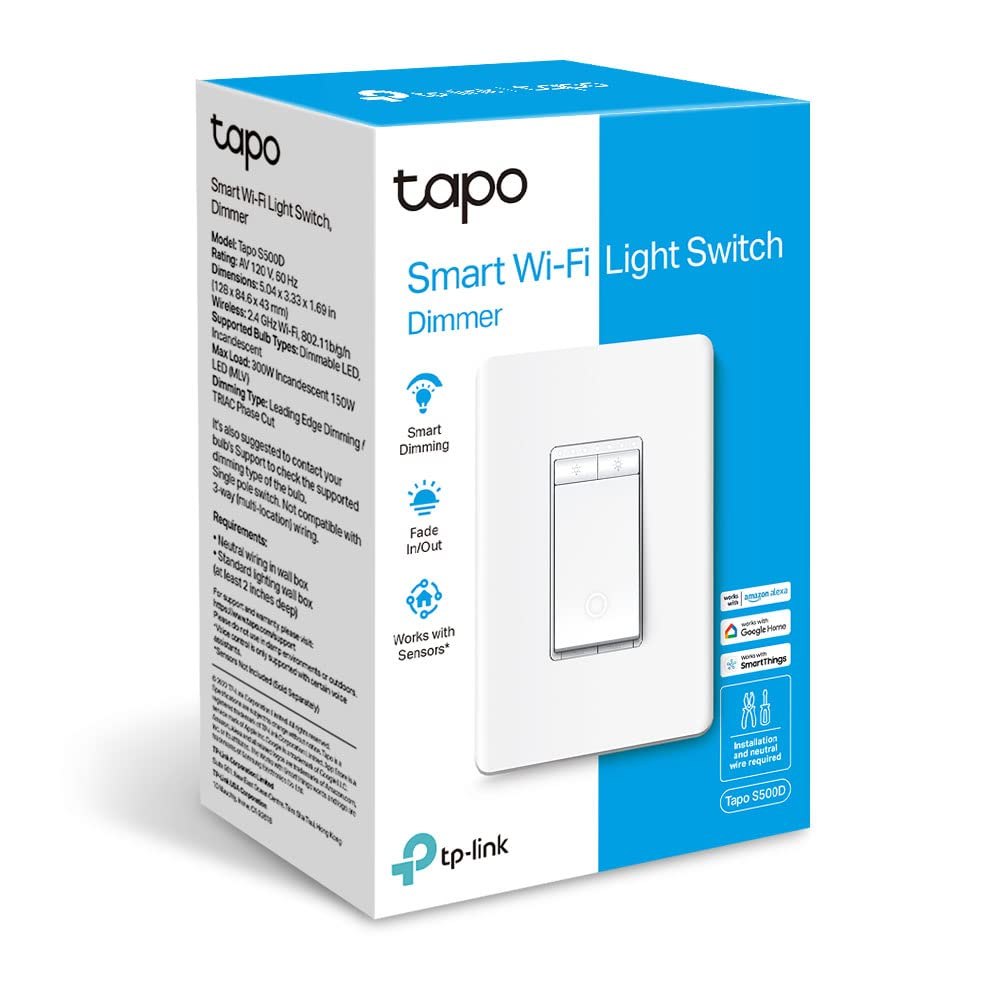
You already know the frustration of replacing a standard light switch with a smart one that requires a hub, a specific 3.0GHz router, or a neutral wire you cannot find in the wall. The TP-Link USA Tapo S500D is designed to solve that specific friction. It is a single-pole smart dimmer switch that connects directly to your 2.4GHz Wi-Fi network, eliminating the need for a separate hub. If you are replacing a standard dimmer or a non-dimmer switch in a room where you want to adjust brightness from your phone or voice assistant, this is the tool for the job.
The setup process is straightforward for anyone comfortable with a screwdriver and a multimeter, as the device requires a neutral wire connection. It integrates with Alexa and Google Home, allowing you to control the light from anywhere you have internet access. If you are looking for a reliable, hub-free way to smarten up your lighting without buying a whole new ecosystem, the Tapo S500D is a practical choice.
Quick Answer
| Category | Details |
|---|---|
| Best for | Homeowners with 2.4GHz Wi-Fi and neutral wires who want hub-free dimming. |
| Skip if | You do not have a neutral wire, use 5GHz-only Wi-Fi, or need a 3-way switch. |
| One line | A reliable, UL-certified smart dimmer that works with Alexa and Google Home without a hub. |
Swipe sideways to compare →
What actually changes the buy is fit, what you should skip, and which tradeoffs show up after week one — not a longer spec sheet. If you already know the job, see current options while you read the criteria.
Official Specs and Facts
Based on the official TP-Link USA product page, here are the key specifications for the Tapo S500D.
| Feature | Specification |
|---|---|
| Model | Tapo S500D |
| Type | Smart Dimmer Switch, Single Pole |
| Wire Requirement | Neutral Wire Required |
| Wi-Fi Band | 2.4GHz only |
| Hub Requirement | No Hub Required |
| Voice Assistants | Amazon Alexa, Google Home |
| Certification | UL Certified |
| Color | White |
| Shipping | Free shipping mentioned on official site (confirm regions) |
Swipe sideways to compare →
Note: If you are unsure about your wiring, verify the presence of a neutral wire in your switch box before purchasing. TP-Link offers free shipping on many orders, but regional availability may vary.
What reviewers say
Reviews from YouTube say this about the TP-Link USA Tapo S500D.
One YouTube reviewer noted, "So, it's got a flashing green and red lights, which is great, cuz that means that it is ready for setup." This visual indicator simplifies the initial pairing process, ensuring you know exactly when the device is ready to connect to the Tapo app without guessing. Confirm details on the current product page.
Another YouTube review highlighted, "The Tapo S500 comes in a convenient four-pack, which is perfect for those looking to upgrade multiple switches at once." While the S500D is often sold individually, the availability of multi-packs for the S500 series makes it an excellent option for whole-home lighting upgrades where consistency and bulk installation are priorities. Check the official listing before you buy.
A third YouTube video titled "TP-Link Tapo S505 Smart Light Switch Review: Matter, HomeKit, and Voice Control Explained" provides context on the broader Tapo switch lineup. While this specific review covers the S505, it underscores the reliability of TP-Link's voice control integration, a feature the S500D also supports via Alexa and Google Home.
Who it's for
The Tapo S500D is ideal for homeowners who want to integrate smart lighting into their existing infrastructure without adding another hub to the network. If you have a 2.4GHz Wi-Fi network and your light switches have neutral wires, this device fits seamlessly into your smart home routine. Check the official listing before you buy.
- Hub-free users: You do not want to buy a separate Zigbee or Z-Wave hub. The S500D connects directly to Wi-Fi.
- Voice assistant users: You rely on Alexa or Google Home for daily control and want reliable, low-latency voice commands.
- Bulk upgraders: You are replacing multiple switches and want a consistent, reliable brand that offers easy app management.
- DIY installers: You are comfortable turning off the breaker, removing the old switch, and connecting the neutral, live, and load wires. See options
If you are looking for a straightforward way to add dimming capabilities to your main living areas, the Tapo S500D offers a clean, white design that blends into most modern interiors.
Who should skip
This switch is not a universal solution. If your home’s wiring or network setup does not match the S500D’s requirements, you will face installation or connectivity issues. You can see current options.
- No neutral wire: If your switch box only has two wires (hot and load) and no neutral, this device will not work. You would need a smart bulb or a switch designed for non-neutral wiring.
- 5GHz-only Wi-Fi: If your router only broadcasts on 5GHz, the S500D will not connect. Most modern routers broadcast both, but some older or specific setups may not.
- 3-way or 4-way circuits: The S500D is a single-pole switch. If your light is controlled by two or more switches, you will need a different model.
- Matter/HomeKit priority: If you specifically require native Matter or Apple HomeKit support, the S500D relies on Alexa/Google Home. While TP-Link is expanding its Matter support, verify current compatibility for this specific SKU on the brand page if this is a dealbreaker.
For those with complex wiring, it is often safer to consult an electrician or look for a smart bulb solution that bypasses the switch wiring entirely. You can explore other smart home options in our smart home guide to find the right fit for your specific setup. Confirm details on the current product page.
Mid-check
If the criteria above already match how you actually use the space, stop here and check current options before you keep reading comparison noise. Confirm details on the current product page.
How to choose in five minutes
- Check your Wi-Fi band: Ensure your router broadcasts on 2.4GHz. Most routers do, but if you have separated your bands, verify the S500D can see the 2.4GHz network. See options
- Inspect the wiring: Turn off the breaker and remove the existing switch. Look for a white or gray wire (neutral) in the box. If you only see two colored wires (black/red and white/gray) connected to the switch terminals, you likely do not have a neutral. See options
- Verify single-pole: Confirm the light is controlled by only one switch. If there is another switch elsewhere that controls the same light, this is a multi-way circuit and the S500D will not work. See options
- Check app compatibility: Download the Tapo app and ensure it works with your preferred voice assistant (Alexa or Google Home). See options
- Compare packs: If you are upgrading multiple rooms, check if a multi-pack of the Tapo S500D is available for a better per-unit price.
If you pass these checks, the S500D is a solid choice. For more detailed setup instructions, refer to the TP-Link setup guide for best practices. Confirm details on the current product page.
FAQ
Does the TP-Link USA Tapo S500D require a hub? No, the S500D connects directly to your 2.4GHz Wi-Fi network. It does not require a separate Zigbee, Z-Wave, or Thread hub.
Can I use the Tapo S500D with Apple HomeKit? The S500D is primarily designed for Amazon Alexa and Google Home. While TP-Link is integrating Matter support across its lineup, you should verify current Matter/HomeKit compatibility for the S500D specifically on the official TP-Link product page, as this feature may vary by firmware version.
Is the Tapo S500D compatible with LED bulbs? Yes, the S500D is compatible with standard LED bulbs. However, some very low-wattage LEDs may flicker at low dimming levels. If you experience flickering, try using a slightly higher-wattage LED or adjusting the dimming range in the app. You can see current options.
What is the warranty for the Tapo S500D? TP-Link typically offers a limited warranty on its consumer electronics. For the exact duration and terms of the S500D warranty, please check the official TP-Link USA support page, as policies can change.
Do I need to replace the old switch? Yes, the Tapo S500D is a replacement switch. You will remove your existing standard switch and install the S500D in its place, connecting the neutral, live, and load wires according to the diagram in the box. Check the official listing before you buy.
If the FAQ answered your main objections and you want current models or trial terms, see brand options.
Bottom Line
The TP-Link USA Tapo S500D is a no-nonsense, reliable smart dimmer switch for homeowners who have the wiring and Wi-Fi infrastructure to support it. It eliminates the need for a hub, offers seamless integration with major voice assistants, and provides a straightforward installation process for those with neutral wires. If you are looking to upgrade your lighting without overcomplicating your smart home network, this is a strong option.
Sources
- YouTube — https://www.youtube.com/watch?v=SH4fw751DvU&t=290s
- YouTube — https://www.youtube.com/watch?v=6puEsm6bSvA&t=42s
- YouTube — https://www.youtube.com/watch?v=N9Xz8mn8lqQ
Related Links