TP-Link USA P125: Review of the Tapo Apple HomeKit Smart Plug Mini
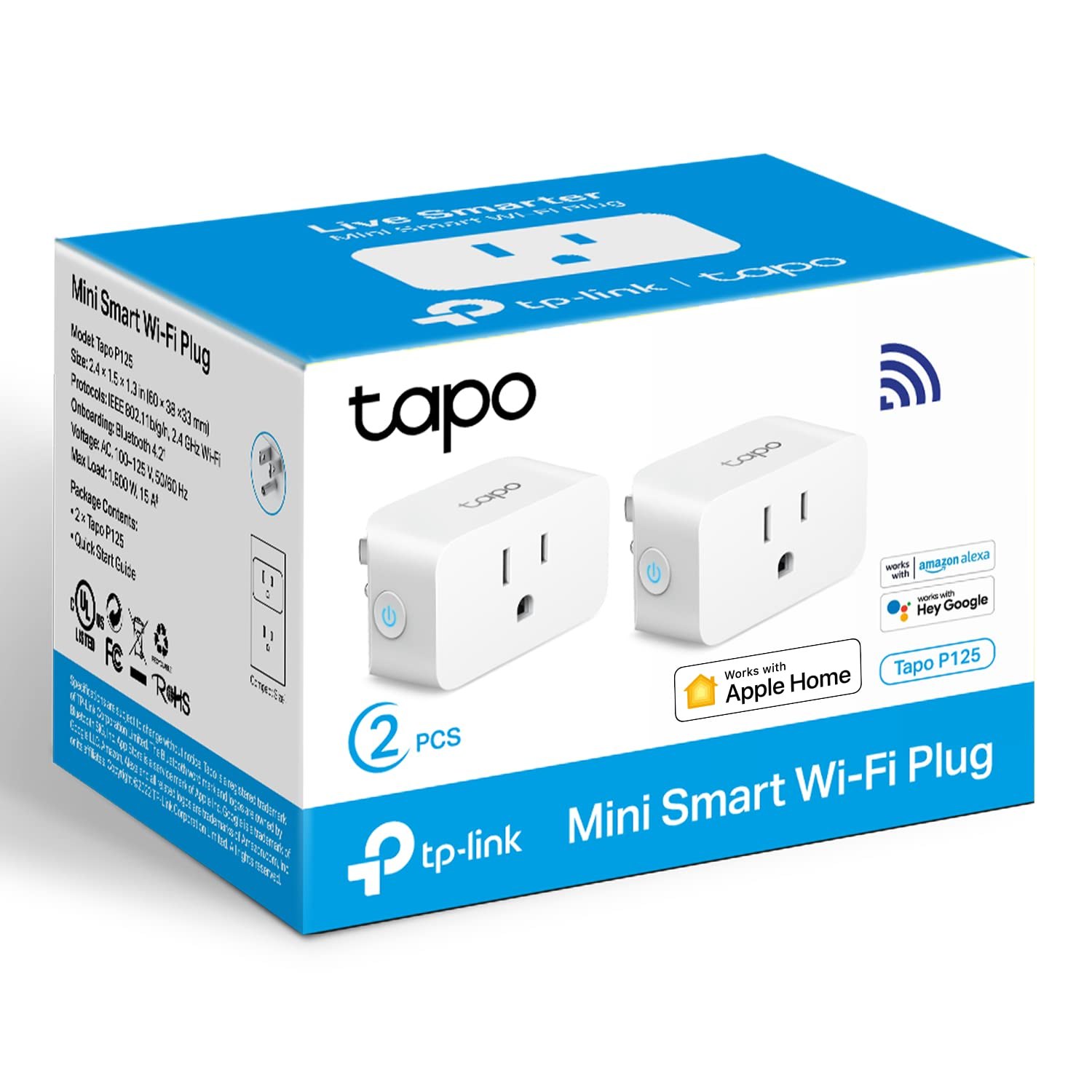
If you are trying to automate a lamp, a space heater, or a fan without buying a whole new smart home ecosystem, the TP-Link USA P125 is the specific part of the puzzle that fits. It is a compact smart plug designed to sit directly in an outlet, taking up minimal space while handling the heavy lifting of remote control and scheduling. The "Mini" designation is not just marketing; the physical footprint is small enough that it rarely blocks the adjacent socket, which is a common pain point with bulkier smart plugs.
This model stands out because it is UL-certified and built for 2.4 GHz Wi-Fi networks, ensuring it connects reliably to the router in most homes. It integrates with Siri, Alexa, and Google Home, but its native Apple HomeKit support makes it a strong choice for users who want local control and privacy without third-party bridges. If you are looking for a straightforward way to turn a dumb device smart, the TP-Link USA P125 is a practical, no-nonsense tool that does exactly what it promises.
Quick Answer
| Best for | Apple HomeKit users who want a compact, UL-certified smart plug for 2.4 GHz networks. |
| Skip if | You need 5 GHz Wi-Fi support, want to control multiple plugs from a single physical unit, or require a neutral wire for in-wall installation. |
| One line | A small, affordable Tapo smart plug that brings Apple HomeKit compatibility to standard outlets. |
Swipe sideways to compare →
What actually changes the buy is fit, what you should skip, and which tradeoffs show up after week one — not a longer spec sheet. If you already know the job, see current options while you read the criteria.
What the Official Page Lists
The official product listing for the TP-Link USA P125 provides the following confirmed specifications. Note that this is a 2-pack configuration based on the SKU name P125(2-Pack).
| Feature | Specification |
|---|---|
| Model Name | Tapo P125 (Apple HomeKit Smart Plug Mini) |
| Pack Size | 2-Pack |
| Max Load | 15A / 1800W |
| Wi-Fi Band | 2.4 GHz only |
| Certification | UL Certified |
| Voice Assistants | Siri, Alexa, Google Home |
| Color | White |
| Design | Compact / Mini |
| Setup | Super easy setup via Tapo App |
Swipe sideways to compare →
Note: The official TP-Link Tapo store mentions free shipping on select items; verify current shipping policies and regional availability on the brand’s site before ordering.
What reviewers say
Reviews from YouTube say this about the TP-Link USA P125.
On YouTube, one reviewer notes that the TP-Link Tapo P125M is a "small, affordable smart plug that offers impressive functionality." That compact form factor is the key selling point here; it allows you to place the plug in tight spaces behind furniture or in crowded power strips without creating a cluttered mess. Another video highlights that with support for multiple devices at once, it is "perfect for hotels, Airbnb's, airports, and even home use." This versatility makes it a solid choice for both residential automation and short-term rental properties where reliable, app-based control is essential.
Who it's for
The TP-Link USA P125 is designed for homeowners and renters who want to integrate specific appliances into their smart home without a complex setup. It is particularly well-suited for the following users:
- Apple HomeKit enthusiasts: If you use Siri and want your plugs to appear natively in the Home app, this is a dedicated option.
- Users with 2.4 GHz routers: Since the plug only supports 2.4 GHz Wi-Fi, it is ideal for homes with standard dual-band or single-band 2.4 GHz networks.
- Space-conscious installers: The mini design is perfect for outlets where space is limited, such as behind dressers or in kitchen backsplashes.
- Multi-device managers: The 2-pack format allows you to set up paired devices (like a fan and a light) immediately. See options
If you are building out a smart home ecosystem, consider how this plug fits into your broader setup. You might also want to look at our guide on setting up smart home devices for beginners to ensure your network is ready for these types of IoT devices. You can see current options.
Who should skip
This plug is not a universal solution for every smart home need. You should look elsewhere if:
- You rely on 5 GHz Wi-Fi: The TP-Link USA P125 does not support 5 GHz bands. If your router only broadcasts on 5 GHz, this plug will not connect.
- You need high-power industrial loads: While 1800W is sufficient for most household appliances, it is not designed for heavy industrial machinery or high-draw commercial equipment.
- You want in-wall installation: This is a plug-in device, not a switch. It requires an accessible outlet and does not replace a light switch.
- You require mesh Wi-Fi roaming: As a standard IoT device, it may not handle mesh network roaming as gracefully as dedicated smart home hubs.
If you are unsure whether your network will support this device, our guide on choosing the right router for smart home devices can help you verify your Wi-Fi bands. Check the official listing before you buy.
Mid-check
If the criteria above already match how you actually use the space, stop here and check current options before you keep reading comparison noise. Confirm details on the current product page.
How to choose in five minutes
Before you buy the TP-Link USA P125, run through this quick checklist to ensure it fits your setup:
- Check your Wi-Fi band: Confirm your router broadcasts a 2.4 GHz signal. If you have a dual-band router, make sure the 2.4 GHz network is active and not hidden. See options
- Verify your load: Add up the wattage of the devices you plan to plug in. Ensure the total does not exceed 1800W. For example, a 1500W space heater and a 500W lamp would exceed the limit. See options
- Confirm HomeKit compatibility: If you are using Apple devices, ensure your iOS version is up to date to support the latest HomeKit integrations. See options
- Assess outlet space: Measure the outlet where you plan to install the plug. The mini design is compact, but you still need to ensure it does not interfere with adjacent plugs or furniture. See options
If you decide this is the right fit, you can see current options for the TP-Link USA P125 to check availability and pricing.
FAQ
Does the TP-Link USA P125 work with 5 GHz Wi-Fi? No, the TP-Link USA P125 is designed for 2.4 GHz Wi-Fi networks only. This is standard for many smart plugs to ensure broader compatibility and better range.
Is the TP-Link USA P125 UL-certified? Yes, the product is UL-certified, which means it has been tested for safety and performance. This is an important factor for any device that handles 15A of power.
Can I use the TP-Link USA P125 without the Tapo app? While the app is the primary interface, the plug integrates with Siri, Alexa, and Google Home. Once set up, you can control it via voice commands without opening the app.
How many devices can I control with one TP-Link USA P125? Each physical plug controls one outlet. The 2-pack includes two separate plugs, allowing you to control two different devices independently.
If the FAQ answered your main objections and you want current models or trial terms, see brand options.
Bottom Line
The TP-Link USA P125 is a reliable, compact smart plug that brings Apple HomeKit integration to standard outlets. Its UL certification and 1800W capacity make it a safe choice for most household appliances, while its mini design ensures it fits in tight spaces. If you are looking for a straightforward way to automate your home without a complex setup, this is a solid option.
For those ready to upgrade their smart home, see current options to find the best price on the TP-Link USA P125.
Sources
- YouTube — TP-Link Tapo P125M Review
- YouTube — TP-Link Tapo P125M Multi-Device Use
Related Links