Rexing C3 3 Channel Dash Cam Review
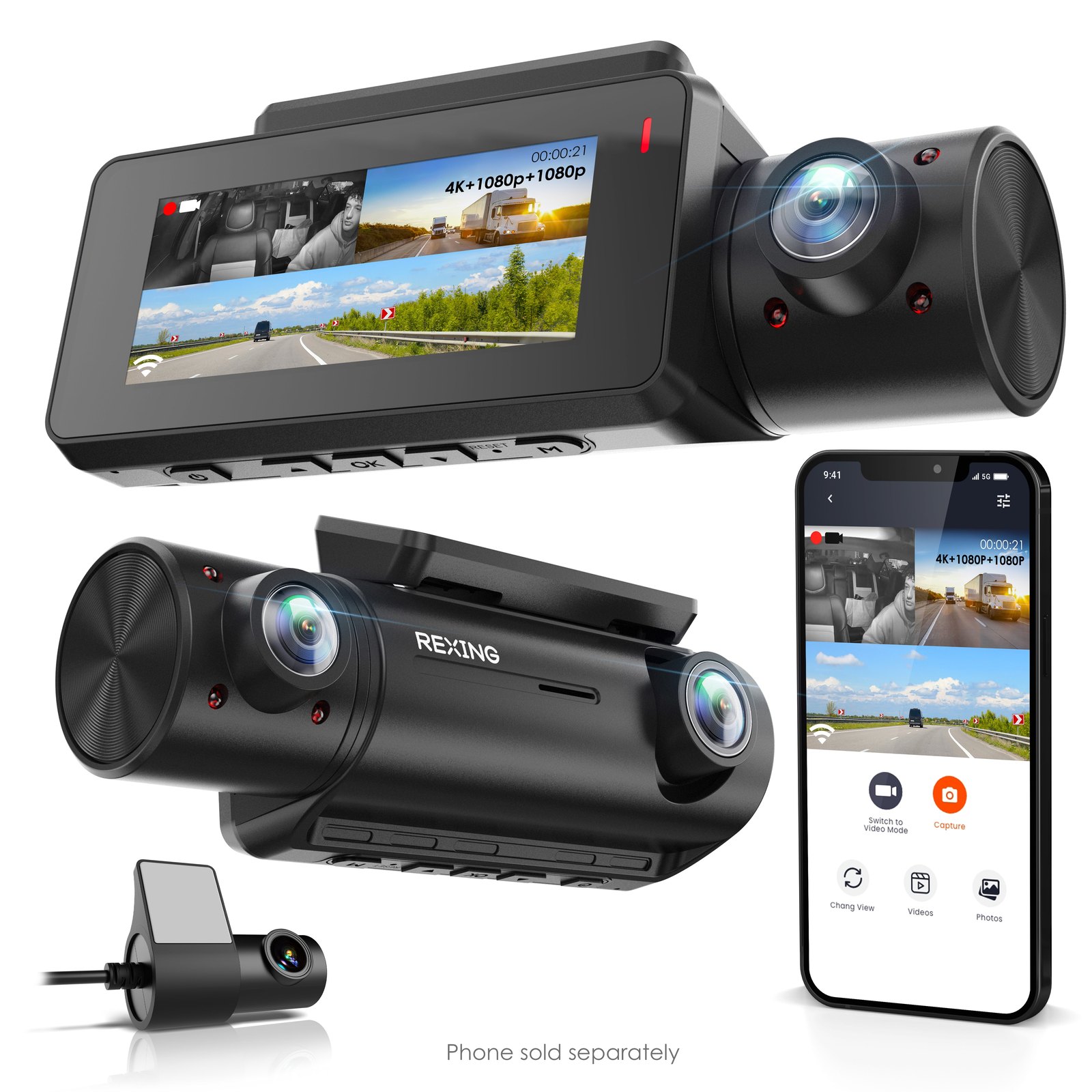
If you drive for a living or haul passengers, the gap between a single front-facing camera and a full three-channel setup is the difference between proving you weren’t at fault and having no record of what happened in the back seat. The Rexing C3 3 Channel Dash Cam records the road ahead in 4K while simultaneously capturing the cabin and the rear of the vehicle in 1080p, creating a complete visual log of every trip. It is built for drivers who need evidence from multiple angles, not just a clip of the windshield. You can check the Rexing C3 3 Channel Dash Cam to see current pricing and confirm the exact lens specifications before you commit to a hardwire installation.
| Best for | Skip if | One line |
|---|---|---|
| Rideshare, taxi, and fleet drivers who need cabin and rear evidence | Drivers who only want a simple front-facing recorder for parking | A 4K front, 1080p cabin, and 1080p rear recorder in a compact three-channel setup. |
Swipe sideways to compare →
What the official page lists
Rexing positions the C3 as a high-resolution, multi-angle solution. The official product page details the following configuration for this specific SKU:
- Front Camera: 4K resolution
- Cabin Camera: 1080p resolution
- Rear Camera: 1080p resolution
- Connectivity: Wi-Fi enabled for app-based management
- Support: Rexing products come with online support and 18-month support backing
- Updates: Firmware updates are provided to improve product performance over time
If you are considering the storage requirements for this level of video data, you may also want to look at Rexing’s dedicated dash cam SD cards, which are engineered for continuous recording and high-speed transfer.
What reviewers say
Reviews from YouTube say this about the Rexing C3 3 Channel Dash Cam.
On YouTube, a reviewer discussing the Rexing 3-channel lineup noted, "And this brings me to what I think is the best feature on the Rexin M3 mirror dash cam," highlighting the value of the mirror-style integration and the comprehensive coverage provided by the multi-channel setup. This sentiment aligns with the C3’s design philosophy, where the goal is to eliminate blind spots rather than just recording the road. Another video titled "Uber Driver Dashcam Review" features the Rexing hardware in a professional driving context, suggesting that the system holds up well for drivers who rely on these cameras for daily work protection.
Who it's for
This camera is built for drivers who treat their vehicle as a professional tool or who simply want total peace of mind regarding passenger interactions and rear-end collisions. Check the official listing before you buy.
- Rideshare and Taxi Drivers: If you drive for Uber, Lyft, or a taxi service, the cabin camera is a critical feature. It provides a clear record of passenger behavior, which can be vital in disputes or safety incidents. The Rexing C3 3 Channel Dash Cam handles this workload with 1080p clarity in the interior.
- Fleet Managers: For small fleets, the 4K front camera ensures that license plates and road signs are legible in accident reports, while the rear camera covers the vehicle’s back end.
- Safety-Conscious Commuters: If you frequently drive in heavy traffic or construction zones, the 4K front lens captures fine details that lower-resolution cameras might miss, such as brake lights or debris on the road.
Who should skip
This is a premium, multi-channel system, so it may be overkill for some use cases. Confirm details on the current product page.
- Budget-Conscious Drivers: If you only need a basic front-facing camera to prove you weren’t rear-ended, a single-channel dash cam will cost significantly less. The C3’s three-channel setup adds complexity and cost that you may not need.
- Drivers Who Hate Wiring: While the C3 can run on 12V, getting the most out of parking mode and continuous recording often requires a hardwire kit. If you are not comfortable with basic car electronics or do not want to run wires to the fuse box, the setup process might be more than you want to deal with. You can explore Rexing’s Smart Hardwire Kit if you decide to go the wired route, but be prepared for the installation work.
- Those Who Prefer Minimal Footprint: Three cameras mean three mounts. If you have a very small windshield or a specific interior aesthetic you want to maintain, the additional cabin and rear cameras may feel intrusive.
Mid-check
If the criteria above already match how you actually use the space, stop here and check current options before you keep reading comparison noise. Confirm details on the current product page.
How to choose in five minutes
If you are on the fence about the Rexing C3, here is how to decide quickly:
- Check Your Storage Needs: 4K video eats storage. Ensure you have a high-endurance microSD card. Rexing sells 256GB MicroSDXC UHS-3 cards specifically designed for dash cams, which is a safer bet than a standard phone card.
- Verify Your Power Setup: Decide if you will use the 12V outlet or a hardwire kit. If you plan to use parking mode, a hardwire kit is almost mandatory to prevent battery drain. See options
- Confirm the Lens Quality: Look at the official spec sheet to confirm the 4K front lens meets your expectations for night driving. If you drive at night often, this is the most critical feature. See options
- Read the Warranty: Rexing offers 18-month support. This is a solid window for a consumer electronic device, but it is worth noting compared to some competitors who offer one or two years.
- Compare with Alternatives: If the price is high, look at the Rexing F30 4K+1080p Dual Dash Cam if you don’t need the cabin camera. It offers similar front-end quality without the interior recording.
FAQ
Does the Rexing C3 3 Channel Dash Cam require a hardwire kit to function? No, it can run on the 12V cigarette lighter port. However, for parking mode and continuous recording without draining your car battery, a hardwire kit is recommended. Rexing sells a Smart Hardwire Kit with 360° Motion Detection that pairs well with this system.
What is the difference between the C3 and the M3? The C3 is a traditional dash cam setup with separate front, cabin, and rear cameras. The M3 is a mirror-style dash cam that integrates the front camera into the rearview mirror. Both offer 3-channel recording, but the form factor is different. If you prefer a clean windshield, the Rexing M3 might be a better fit.
Is the cabin camera visible to passengers? Yes, the cabin camera is a physical unit that needs to be mounted, usually near the rearview mirror or on the dashboard. It is not hidden. Drivers should inform passengers that they are being recorded, especially if they are in a professional capacity. Confirm details on the current product page.
Can I manage the C3 with my phone? Yes, the C3 is Wi-Fi enabled. You can connect to it via the Rexing app to view, download, and manage footage directly from your smartphone.
Bottom line
The Rexing C3 3 Channel Dash Cam is a serious tool for drivers who need comprehensive video evidence. It doesn’t just watch the road; it watches the entire vehicle. If you drive for a living or want to protect your passengers and your car from all angles, the 4K front and 1080p cabin/rear combination is hard to beat in this price range. If you only need front-facing coverage, look elsewhere. But if you need the full picture, see current options for the Rexing C3 3 Channel Dash Cam.
For more on how to choose the right camera for your specific driving needs, check out our guide on dash cam installation basics and our comparison of best dash cams for rideshare drivers.
Sources
- YouTube — Rexing V33 3-Channel Dashcam Review! — https://www.youtube.com/watch?v=4umWEWfSbMk
- YouTube — And this brings me to what I think is the best feature on the Rexin M3 mirror dash cam — https://www.youtube.com/watch?v=5TAoZ4_rk1I&t=816s
- YouTube — Uber Driver Dashcam Review — https://www.youtube.com/watch?v=MMhlJf1AI2I