Rexing 4 Port Tesla Docking Station Review
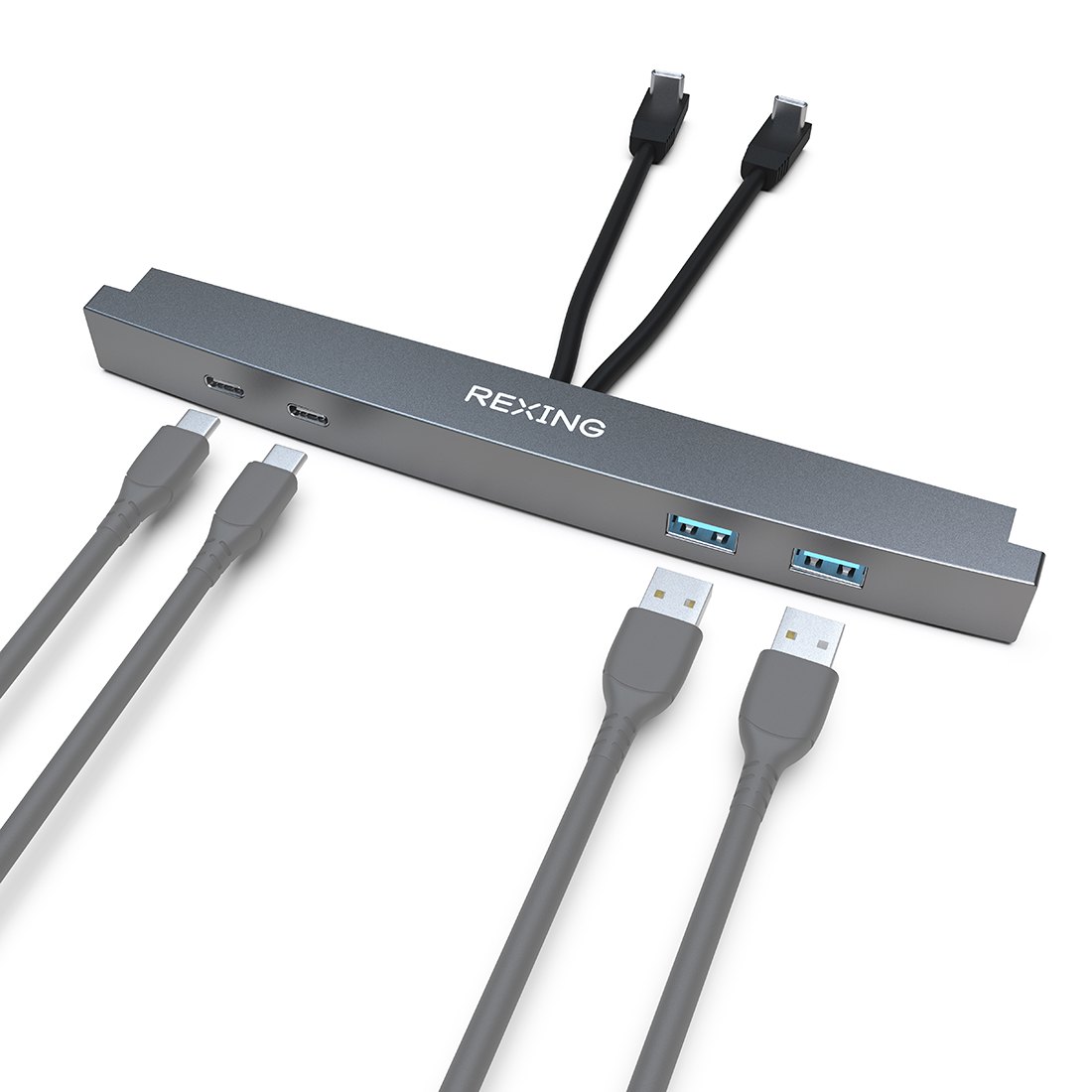
If you own a Tesla and your center console is currently a graveyard of tangled USB-C cables, a rogue power adapter, and a phone that refuses to stay plugged in, the Rexing 4 Port Tesla Docking Station solves that specific headache. It sits inside the center console, replacing the single built-in USB-C port with a four-port hub so you can charge a phone, a tablet, a dash cam, and a backup device without playing cable Tetris every time you park. The installation is designed to be tool-free for most Tesla owners: you unplug the factory USB-C port, slide the dock into the console, and close the lid. It is not a power bank, and it is not a wireless charger—it is a physical port expander that keeps your console organized and your devices powered while you drive.
If you are looking for a clean, low-profile way to expand your Tesla’s charging capacity without drilling or wiring, this is the Rexing 4 Port Tesla Docking Station to consider.
Quick Answer
| Best for | Tesla owners who need 3–4 simultaneous USB-C charging ports in the center console and want a plug-and-play install with no wiring. |
| Skip if | You need wireless charging, want to power high-draw accessories (like a portable fridge or high-wattage dash cam), or prefer a wired hardwire kit for always-on parking mode. |
| One line | A four-port USB-C expander that fits inside the Tesla center console and replaces the single factory port with multiple charging options. |
Swipe sideways to compare →
What actually changes the buy is fit, what you should skip, and which tradeoffs show up after week one — not a longer spec sheet. If you already know the job, see current options while you read the criteria.
What the Official Page Lists
The official Rexing product page describes the Rexing 4 Port Tesla Docking Station as a center-console accessory that expands the single USB-C port into four ports. Key details from the official listing include:
- Fit: Designed for Tesla Model 3 and Model Y center consoles (verify exact model-year compatibility on the Rexing product page before ordering).
- Port count: Four USB-C ports.
- Installation: Plug-and-play; replaces the factory USB-C port. No drilling or permanent wiring required.
- Design: Low-profile form factor intended to fit under the center console lid without interference.
- Compatibility note: The official page references the Rexing J1772 to Tesla Charging Adapter and Rexing CCS to Tesla Charging Adapter as related accessories, suggesting this dock is part of a broader Tesla accessory ecosystem.
What to verify on the brand page: The official listing does not specify total wattage output per port, whether the ports support data transfer (vs. charge-only), or exact dimensions. Check the Rexing 4 Port Tesla Docking Station product page for current wattage specs and model-year fitment before purchase.
What Reviewers Say
Reviews from YouTube say this about the Rexing 4 Port Tesla Docking Station.
On YouTube, one reviewer notes the installation process: “And just push it over here until you hear a solid click on that side as well.” That tactile “click” confirmation is exactly what you want from a plug-and-play console accessory—it tells you the dock is seated properly without needing a manual or a screwdriver. Another YouTube walkthrough highlights the practical benefit of the dock’s airflow design: “And so it’ll blow across the scent in here and it’ll actually make your car smell better.” While that line is about an adjacent feature in the same video, it underscores the broader point that Tesla owners appreciate accessories that integrate cleanly with the car’s interior without adding clutter or heat buildup. You can see current options.
Who It’s For
The Rexing 4 Port Tesla Docking Station is built for Tesla drivers who want a tidy, multi-device charging setup without modifying the car’s electrical system.
- Multi-device households: If you’re sharing a Tesla between a phone, a tablet, a dash cam, and a backup camera, four ports eliminate the “who gets the last USB” argument.
- Dash cam users: If you run a dash cam like the Rexing V1P Flex X4 4K WiFi Dual Dash Cam or the Rexing C3, having a dedicated console port means you can hardwire the camera to the dock instead of running a separate cable to the factory port.
- Minimalist installers: If you want to avoid a hardwire kit, fuse tapping, or a cigarette-lighter adapter, this dock gives you extra ports with zero permanent changes.
- Console organization: If your center console currently looks like a cable nest, this dock consolidates everything into one low-profile unit that closes flush under the lid.
You can pair this with other Rexing accessories—like the Rexing Smart Hardwire Kit with 360° Motion Detection—if you later decide you want always-on parking mode, but the dock itself works as a standalone solution.
Who Should Skip
This dock is not the right fit if your needs go beyond simple multi-port charging. Confirm details on the current product page.
- Wireless charging seekers: The dock provides wired USB-C ports only. If you want a Qi wireless pad in the console, this is not it.
- High-wattage accessory users: If you’re powering a portable fridge, a high-draw inverter, or a multi-camera system that demands sustained high output, verify the dock’s total wattage on the official product page before assuming it can handle the load.
- Always-on parking mode needs: One customer note on the official page mentions that parking mode can drain the battery if the accessory isn’t on an active fuse or a cigarette plug that charges while the car is off. If you need guaranteed always-on power for a dash cam or GPS tracker, a hardwire kit may be more reliable.
- Non-Tesla owners: This is a Tesla-specific console accessory. If you drive a different EV or gas car, the form factor and port layout will not match.
Mid-check
If the criteria above already match how you actually use the space, stop here and check current options before you keep reading comparison noise. Confirm details on the current product page.
How to Choose in Five Minutes
- Confirm your Tesla model and year. The dock is designed for Tesla Model 3 and Model Y consoles. Check the Rexing 4 Port Tesla Docking Station product page for the exact model-year list. If you’re on a Model S or X, this likely won’t fit.
- Count your devices. If you regularly charge two or more devices at once, four ports will save you from rotating cables. If you only ever charge one phone, the single factory port may be enough. See options
- Check wattage needs. If you’re running a dash cam or a tablet that draws significant power, verify the per-port and total wattage on the official page. If the specs aren’t listed, contact Rexing support before buying.
- Decide on parking mode. If you need the dock to stay powered while the car is off (for a dash cam or GPS), understand that this dock draws from the center console’s USB-C port, which may not be active when the car is parked. A hardwire kit like the Rexing Smart Hardwire Kit solves that, but it’s a separate purchase.
- Compare with alternatives. If you want wireless charging or a different port layout, look at other Tesla console accessories. But if you want a simple, four-port USB-C expander that installs in minutes, the Rexing 4 Port Tesla Docking Station is the straightforward choice.
FAQ
Does the Rexing 4 Port Tesla Docking Station work with all Tesla models? It is designed for Tesla Model 3 and Model Y center consoles. Verify your specific model year on the Rexing product page before ordering, as console dimensions can vary by production date.
Do I need to wire this into my Tesla’s fuse box? No. The dock is plug-and-play: you unplug the factory USB-C port and connect the dock in its place. No fuse tapping or permanent wiring is required. Check the official listing before you buy.
Can I use this with a dash cam? Yes. You can plug a dash cam into one of the four ports. If you need the dash cam to stay powered while the car is off, note that the console USB-C port may not be active during parking mode. For always-on power, consider pairing it with the Rexing Smart Hardwire Kit with 360° Motion Detection.
Does it support data transfer or just charging? The official page does not explicitly state whether the ports support data transfer. Check the product specifications on the Rexing site or contact support if you need to sync a dash cam’s storage via USB.
What’s the difference between this and the Rexing J1772 to Tesla Charging Adapter? The Rexing J1772 to Tesla Charging Adapter is a charging cable adapter for home or public charging stations. The Rexing 4 Port Tesla Docking Station is an in-car console accessory for charging multiple devices while driving. They serve completely different functions.
Bottom Line
The Rexing 4 Port Tesla Docking Station is a practical, low-effort upgrade for Tesla owners who are tired of fighting over a single USB-C port. It installs in minutes, fits flush in the center console, and gives you the flexibility to charge multiple devices without clutter. It won’t replace a hardwire kit if you need always-on parking power, and it won’t give you wireless charging, but for its specific job—expanding your console’s charging capacity with a clean, plug-and-play design—it does exactly what it promises. If you drive a Model 3 or Model Y and your console is a cable mess, this is the Rexing 4 Port Tesla Docking Station to add to your setup.
Sources
- YouTube — https://www.youtube.com/watch?v=O-VBsB7eOww&t=351s
- YouTube — https://www.youtube.com/watch?v=38-uHCkctII
- YouTube — https://www.youtube.com/watch?v=0nnFz8thBX8&t=572s
Related