Hohem X3 Review: The AI Stabilizer for Smartphone Video
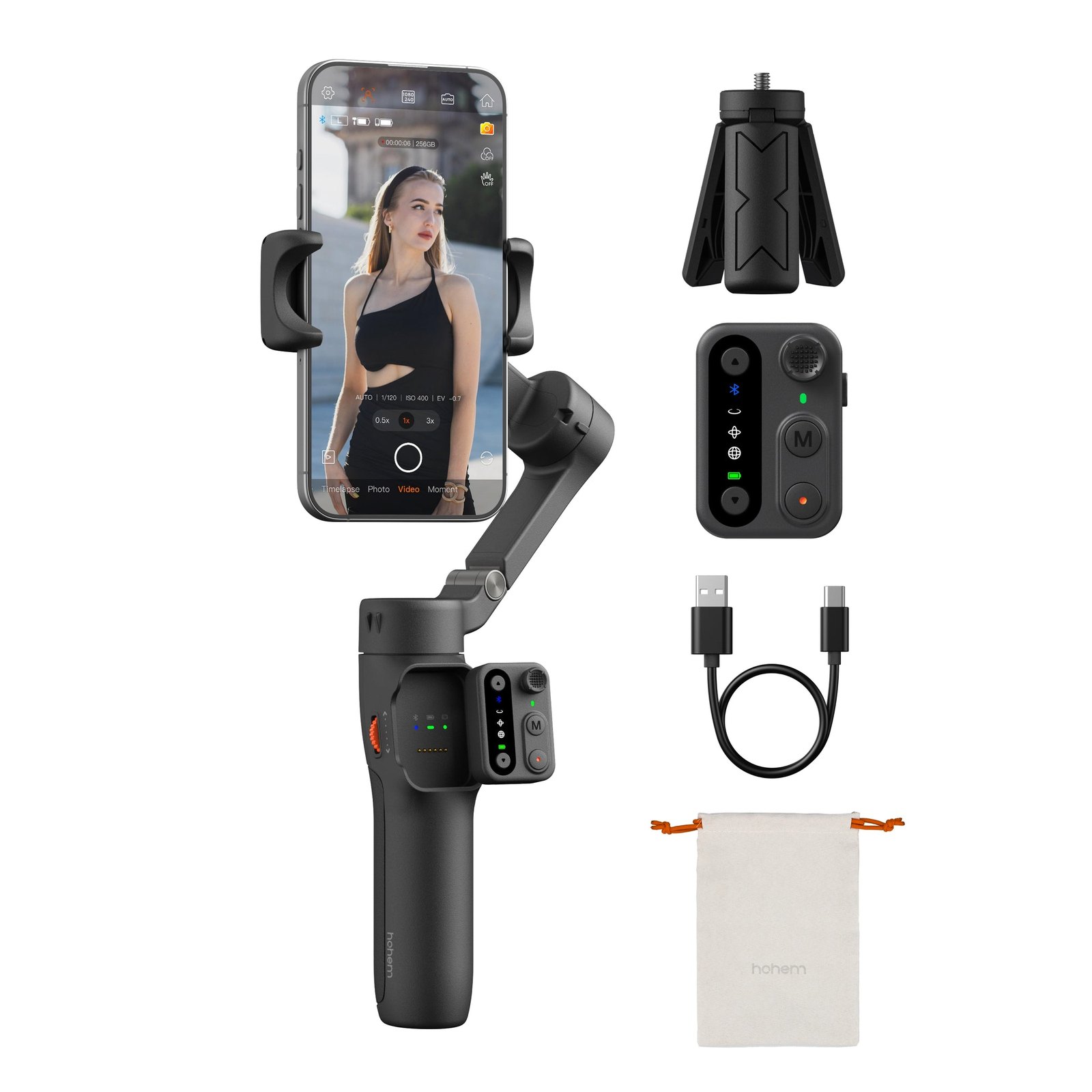
Shaky footage ruins a good story faster than bad lighting. The Hohem X3 is built to fix that exact problem, locking your phone into a three-axis gimbal that smooths out the jitters from walking, running, or quick pans. It is not a pro cinema rig; it is a pocket-sized tool for creators who want steady, cinematic movement without carrying a heavy tripod.
If you are shooting vlogs, real estate walkthroughs, or travel clips, this is the kind of gear that changes the look of your content immediately. The Hohem X3 uses iSteady 8.0 stabilization to keep the horizon level and the motion fluid. You plug in your phone, hit record, and the device handles the physics so you can focus on the shot.
Quick Answer
| Feature | Details |
|---|---|
| Best for | Solo creators, vloggers, and smartphone filmmakers who want smooth, handheld footage. |
| Skip if | You need a heavy-duty cinema mount, multi-camera setups, or do not own a compatible smartphone. |
| One line | The Hohem X3 is a compact, AI-powered stabilizer that makes phone video look professional. |
Swipe sideways to compare →
What actually changes the buy is fit, what you should skip, and which tradeoffs show up after week one — not a longer spec sheet. If you already know the job, see current options while you read the criteria.
Official Specs and Features
The official product page for the Hohem X3 (often listed alongside the X3 SE series) highlights specific stabilization technologies. Here is what the brand lists for this model:
- Stabilization System: iSteady 8.0 Algorithm. This next-gen software ensures footage stays smooth whether you are walking, running, or performing dynamic camera movements.
- Compatibility: Designed for smartphones and cameras. The phone clamp adjusts to fit various device sizes.
- Control Interface: Includes a built-in control dial and buttons for adjusting speed, shutter, and tracking modes.
- Power: Rechargeable internal battery. Note: Specific battery life hours and weight measurements should be verified on the current Hohem X3 product page, as these can vary by firmware and regional model.
- App Support: Works with the Hohem app for advanced settings, tutorials, and remote control.
The design philosophy focuses on ergonomics, allowing you to hold the device for extended periods without wrist fatigue. The Hohem X3 is part of a lineup that includes the X3 SE and X3 SE Plus, but the core stabilization hardware remains consistent across these variants.
What reviewers say
Reviews from YouTube say this about the Hohem X3.
On YouTube, a creator discussing the lineup notes, "But in my opinion, the best part is that the design and everything inside the V3, the X3, and the X3SE is the same." This consistency in build quality is a major plus for buyers who might upgrade later; it means the learning curve and physical handling remain familiar across the Hohem ecosystem.
Another YouTube review highlights the value proposition, stating, "So, based on what exactly you need, you can get the version that fits you best." This is a fair assessment. The Hohem X3 sits in a sweet spot for users who want pro-level stabilization without the premium price tag of flagship cinema gimbals.
A third video titled "Hohem iSteady X3 SE Gimbal Stabilizer for iPhone | Is It Worth It?" explores the fit for iPhone users. The consensus in these reviews is that the device significantly reduces the need for post-production stabilization software, saving time in the editing suite.
Who it's for
The Hohem X3 is ideal for creators who are moving away from static tripod shots. If you are a real estate agent, a travel vlogger, or a content creator who films on the go, the [Hohem X3](https://www.anrdoezrs.net/click-101855392-15434287-1758214800000?sid=home_hohem_blog_hohem-x3_a] eliminates the "jelly" effect that plagues handheld phone video. It is also suitable for beginners who want to learn camera movement without investing in expensive, complex rigs. The intuitive interface means you can get a stable shot in under a minute.
Who should skip
This device is not for you if you are shooting with heavy DSLR or mirrorless cameras that exceed the payload limit of a smartphone gimbal. If you require multi-operator setups or need to mount accessories like large external monitors and heavy lights, the Hohem X3 may feel too compact. Additionally, if you do not plan to use a smartphone as your primary camera, this tool will sit in a drawer.
Mid-check
If the criteria above already match how you actually use the space, stop here and check current options before you keep reading comparison noise. Confirm details on the current product page.
How to choose in five minutes
- Check your phone size: Ensure your device fits within the clamp range. Most modern smartphones fit, but very large or very small devices may require a specific mount. See options
- Verify the model: The Hohem X3 and X3 SE share similar features. If you are buying the Hohem X3, confirm that the specific bundle includes the phone clamp and charging cable you need.
- Download the app: Before you buy, check the Hohem app store listing to ensure it is compatible with your iOS or Android version.
- Compare with the X3 SE Plus: If you need extra battery life or specific accessories, the Hohem X3 might be the better base model, while the Plus adds extras.
- Read the warranty: Confirm the current warranty terms on the brand site, as Hohem typically offers a standard consumer electronics warranty.
FAQ
Is the Hohem X3 compatible with all smartphones? The Hohem X3 is designed for most modern smartphones. However, you should verify the maximum and minimum device width on the official product page to ensure your specific phone model fits securely in the clamp.
What is the difference between the Hohem X3 and the X3 SE? Both models use the iSteady 8.0 stabilization system. The primary differences often lie in the included accessories, battery capacity, and minor design tweaks. The Hohem X3 is the core stabilizer, while the SE variants may offer different bundle options. Check the current specifications on the Hohem store for the exact differences in your region.
Does it work with the Hohem app? Yes. The Hohem X3 connects via Bluetooth to the Hohem app, allowing you to adjust settings, view tutorials, and control the gimbal remotely. This is essential for unlocking the full potential of the AI stabilization features.
What is the warranty on the Hohem X3? Hohem typically provides a standard warranty for consumer electronics. For the most accurate and up-to-date warranty details, including return policies, please verify the current terms on the official Hohem website before purchasing.
Bottom Line
The Hohem X3 is a no-nonsense tool for anyone who wants their smartphone video to look like it was shot on a dolly. It is compact, easy to use, and delivers the smooth, stable footage that modern audiences expect. If you are tired of shaky clips, the [Hohem X3](https://www.anrdoezrs.net/click-101855392-15434287-1758214800000?sid=home_hohem_blog_hohem-x3_a] is a straightforward upgrade that pays for itself in the quality of your content.
Sources
- YouTube Review — https://www.youtube.com/watch?v=8xhgFtPR4TY&t=431s
- YouTube Review — https://www.youtube.com/watch?v=MYx28-aeBds&t=146s
- YouTube Review — https://www.youtube.com/watch?v=GAU_0K7ziKY
Related Guides